
Most people don’t fail at building habits because they lack motivation — they fail because they lose track of their progress. You skip a day, forget where you left off, and by the second week the habit is already gone. A simple habit tracker fixes that problem, and if you already use Microsoft Excel every day, an excel habit tracker is the easiest way to start.
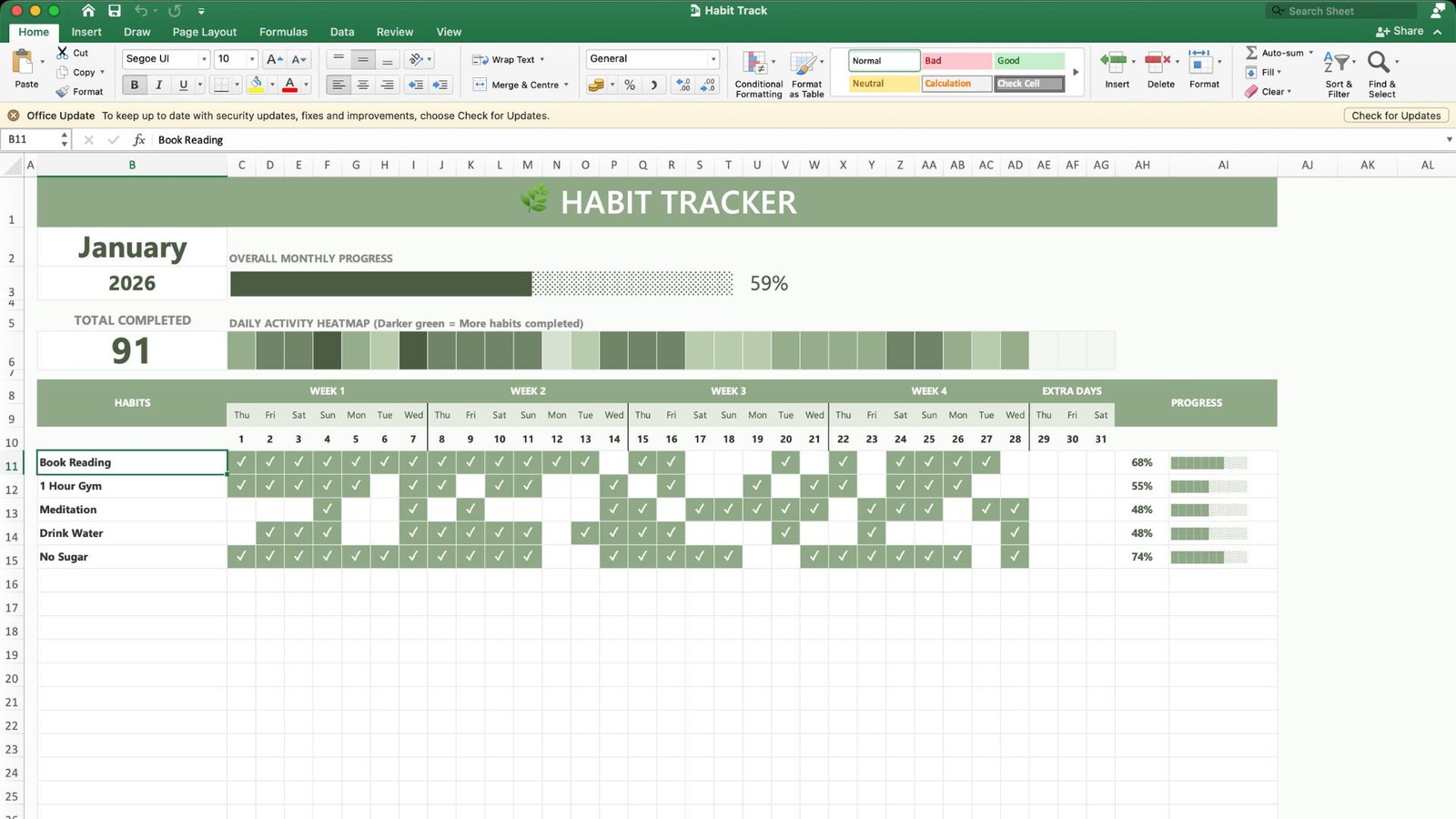
This free habit tracker excel template was built to make daily tracking effortless. No complicated setup, no manual formulas to fix — just open the sheet, tick your habits, and watch your progress update automatically.
Why You Need a Habit Tracker
Whether it’s drinking more water, reading daily, hitting the gym, or cutting down sugar, habits stick when they’re visible. A daily habit tracker gives you:
- A clear visual of consistency — you see exactly which days you showed up and which days you didn’t.
- Motivation through small wins — watching a progress bar fill up is far more motivating than trying to remember if you meditated on Tuesday.
- Accountability without an app — no notifications, no subscriptions, no learning curve. Just a spreadsheet you already know how to use.
Research on habit formation consistently points to one thing: tracking increases follow-through. A habit calendar turns an abstract goal like “be healthier” into a concrete, checkable action you repeat every day.
Why Excel Is the Perfect Tool for Habit Tracking
There are dozens of habit tracking apps out there, but most people already have Excel installed, and that’s exactly why an excel habit tracker template works so well:
- No new software to learn — if you can open a spreadsheet, you can use this tracker.
- Fully offline and private — your habits, your data, stored on your own device.
- Customizable — add new habits, rename columns, change colors, or extend it for a full year.
- Free to use — unlike premium tracking apps, this free habit tracker template costs nothing.
This makes it one of the most practical habit tracker excel template free downloads for anyone who wants results without complexity.
What’s Inside This Habit Tracker Spreadsheet
This isn’t just a plain grid of checkboxes. The template comes with a few smart features that most basic habit tracker spreadsheet files don’t include.
1. One-Click Daily Tracking
Every habit gets its own row, and every day of the month gets its own column. Marking a habit as done is as simple as clicking the cell.
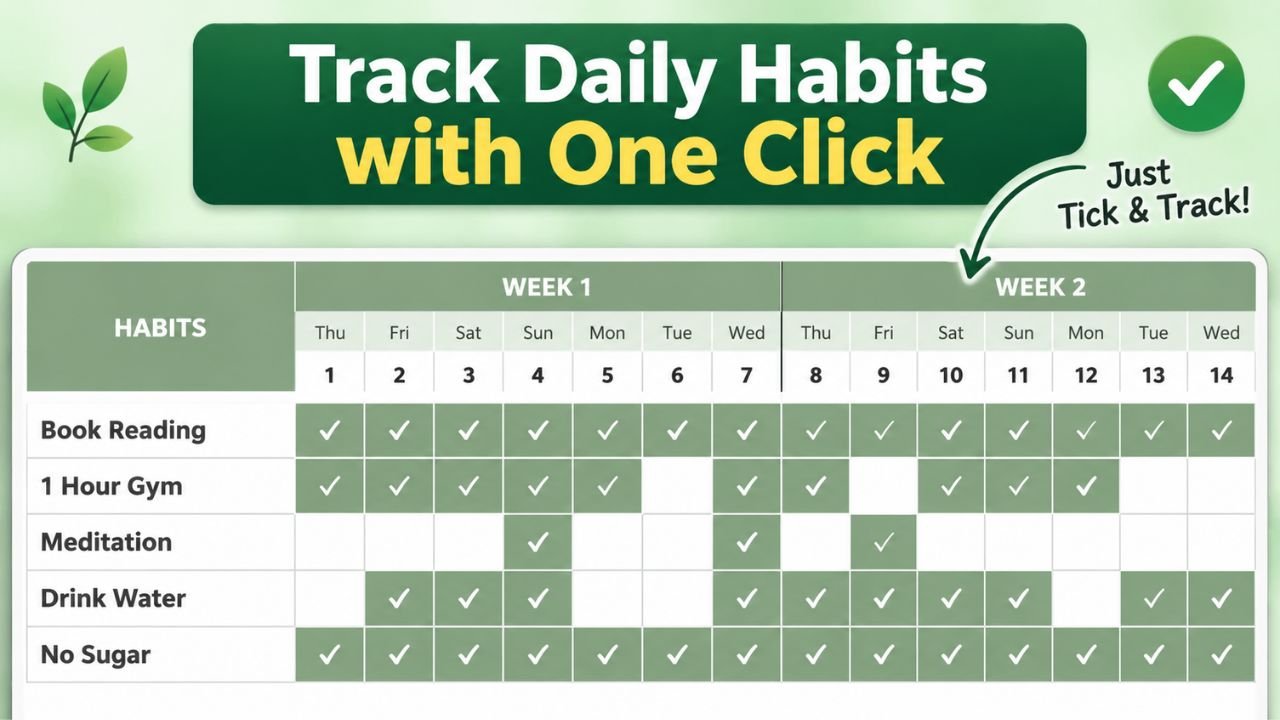
This layout is what makes a daily habit tracker excel sheet actually usable long-term. When tracking takes less than five seconds, you’re far more likely to keep doing it.
2. Instant Completion Percentages
As soon as you tick a habit, the sheet automatically calculates your completion rate for that habit and displays it as both a percentage and a progress bar.
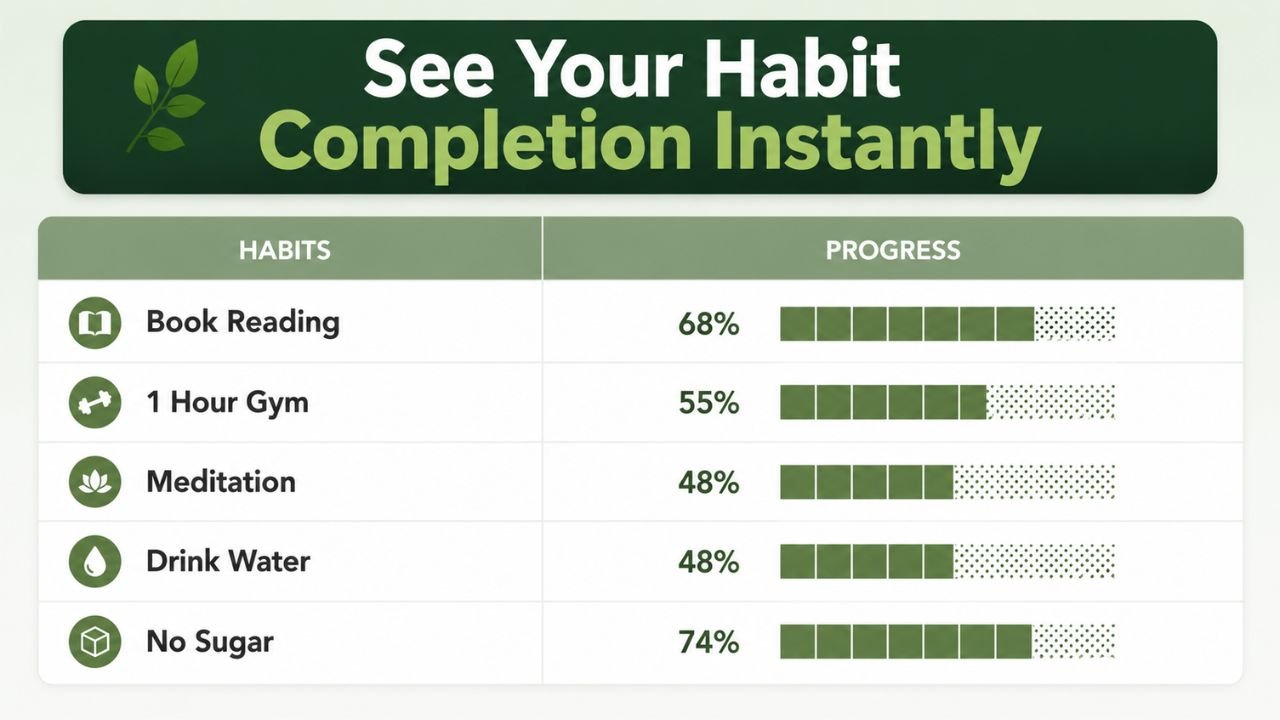
So instead of manually counting how many days you read a book or hit the gym, the habit tracker template excel does the math for you in real time. You always know exactly how consistent you’ve been with each habit — not just a vague feeling of “I think I did okay this month.”
3. Monthly Progress Overview
Zooming out from individual habits, the top of the sheet gives you a monthly summary: total habits completed, an overall progress bar, and a daily activity heatmap where darker green means a more productive day.
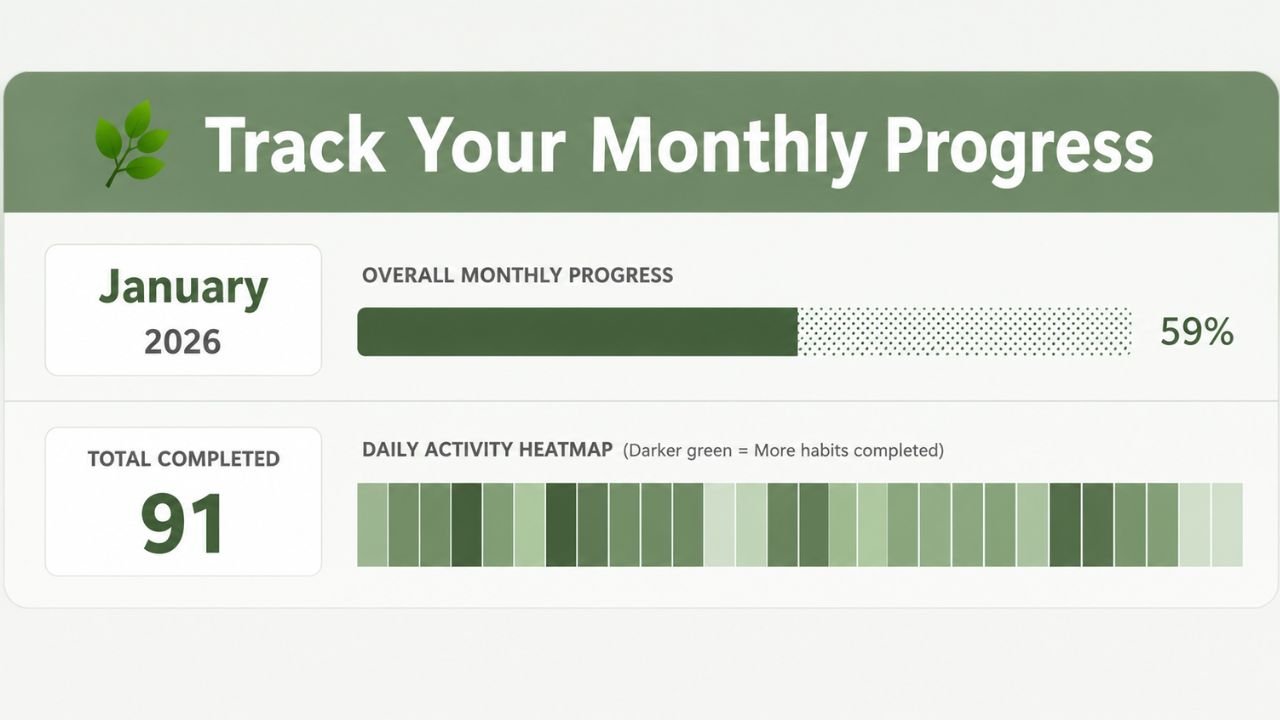
This heatmap view is especially useful for spotting patterns — maybe weekends are consistently weaker than weekdays, or a certain week fell apart because of travel. Once you can see the pattern, you can actually fix it.
Between the one-click tracking, instant percentages, and the monthly heatmap, this template covers everything a good habit tracker spreadsheet should — without ever feeling cluttered or complicated.
How to Use the Habit Tracker Excel Template
Getting started takes less than two minutes:
- Download the file using the link above or below.
- Open it in Excel (or Google Sheets, which also supports .xlsx files).
- Replace the sample habits — “Book Reading,” “1 Hour Gym,” “Meditation,” “Drink Water,” “No Sugar” — with your own.
- Update the month and year at the top of the sheet.
- Click a cell each day to mark a habit as complete.
- Check your progress bars and heatmap weekly to see how consistent you’ve been.
That’s it. There’s no setup, no macros to enable, and no formulas you need to touch unless you want to customize it further.
Tips to Actually Stick With Your Habit Tracker
A tracker only works if you use it consistently. A few practical tips:
- Start with 3–5 habits, not 10. Trying to track too many things at once is a common reason people quit within a week.
- Track at the same time every day. Right after waking up or right before bed works well for most people.
- Don’t skip a day out of guilt. Missing one day is normal — the goal is to get back on track the next day, not to restart from zero.
- Review your heatmap weekly. This is where a habit calendar view becomes powerful — patterns are easier to spot in a week’s worth of data than in a single day.
- Celebrate the percentage, not perfection. A 70% completion rate over a month is still a strong habit forming — you don’t need 100% to see results.
Frequently Asked Questions
Is this habit tracker template really free?
Yes. This free habit tracker template is available to download and use with no cost, sign-up, or subscription required.
Does it work in Google Sheets, or only Excel?
The file is built as a standard .xlsx spreadsheet, so it opens correctly in both Microsoft Excel and Google Sheets.
Can I track more than one month?
Yes. Simply duplicate the sheet within the same workbook, rename it for the new month, and clear the previous checkmarks.
Can I add more habits or remove ones I don’t need?
Absolutely. Just add or delete rows under the “Habits” column — the progress bars and percentage formulas will adjust automatically.
Do I need any Excel experience to use this?
No. If you can click a cell and type text, you already know everything needed to use this daily habit tracker excel sheet.
Download Your Free Habit Tracker Now
Building better habits starts with seeing your progress clearly, and this excel habit tracker template makes that as simple as a single click a day. Whether your goal is reading more, working out, drinking more water, or cutting out bad habits, this tracker gives you the structure to stay consistent.
No sign-up. No cost. Just download, open in Excel, and start tracking today.
Loved it. Thank You!